Implementing Schema ID Header Migration in Kafka: A Practical Guide
Introduction
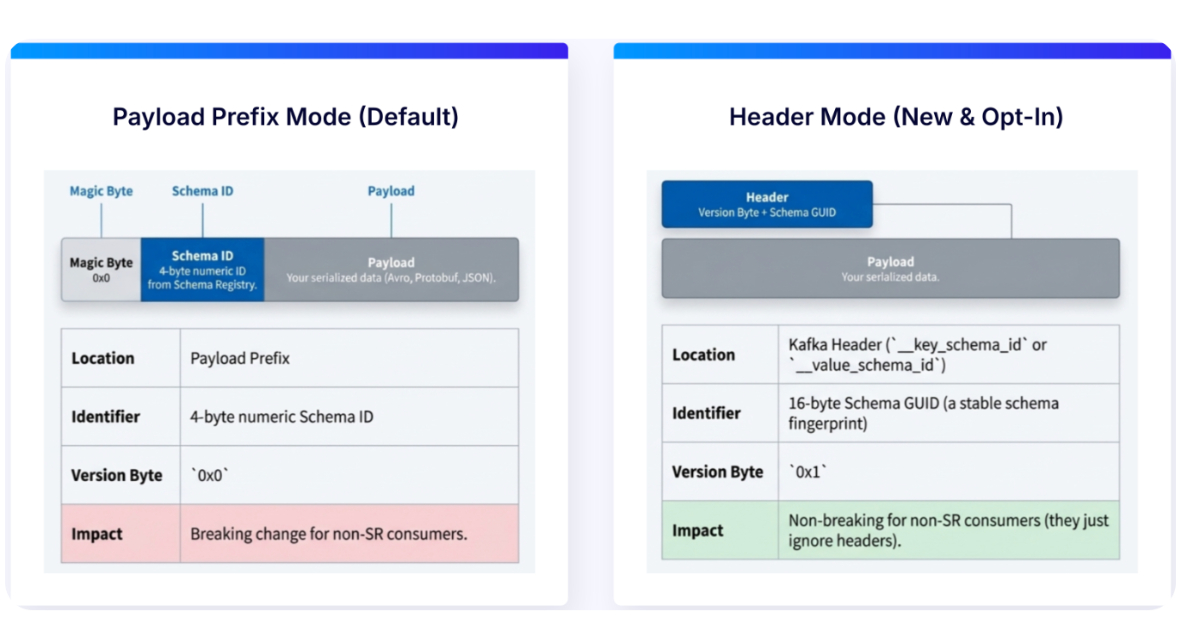
In modern event-driven architectures, managing schema evolution efficiently is critical. Confluent has introduced a paradigm shift: moving schema IDs from message payloads to Kafka record headers. This change simplifies schema governance, enhances compatibility across serialization formats (Avro, Protobuf, JSON Schema), and reduces coupling between data and metadata. This guide walks you through the steps to adopt this new approach, leveraging the Schema Registry to streamline your pipeline.
What You Need
- A running Apache Kafka cluster (version 2.3 or later recommended for header support)
- Confluent Schema Registry (version 7.5+ supporting header-based IDs)
- Kafka client libraries (Java, Python, Go, etc.) that support header-based serialization – typically Confluent’s own clients or updated open-source libraries
- Existing schemas registered in Schema Registry (Avro, Protobuf, or JSON Schema)
- Access to update producer and consumer code (or configuration for frameworks like Kafka Streams, ksqlDB)
Step-by-Step Implementation
Step 1: Upgrade Your Infrastructure
Ensure your Kafka cluster and Schema Registry are running versions that support schema IDs in headers. Upgrade if necessary. For Confluent Platform, version 7.5+ includes this feature. Also update your client libraries to the latest compatible versions. Without this foundation, the header-based approach won’t work reliably.
Step 2: Configure Serialization for Header Mode
In your producer and consumer configurations, enable the flag to use headers for schema IDs. For example, in Java:
props.put(AbstractKafkaSchemaSerDeConfig.USE_HEADERS_FOR_SCHEMA_ID, true);
This tells the serializer/deserializer to embed and retrieve the schema ID from the record headers rather than the payload itself. The property may vary slightly by language; consult your client’s documentation. Ensure that both producers and consumers are set consistently to avoid deserialization errors.
Step 3: Modify Producer Code
Update your producer to include the schema ID in the Kafka record headers. In most implementations, this happens automatically once the configuration is set. However, you may need to adapt custom serializers. For example, if you were manually embedding the schema ID in the Avro payload, remove that logic. The library will automatically add a header (typically named confluent.schema.id) containing the integer ID. Test with a simple producer to verify that the header appears.
Step 4: Update Consumer Code
Consumers now read the schema ID from the record header instead of parsing it from the payload. Again, if you were manually extracting it, simplify your code. Enable the same configuration flag (USE_HEADERS_FOR_SCHEMA_ID) and ensure the deserializer uses headers. Check that consumers can resolve the schema from the Schema Registry using the header ID. This step reduces payload bloat and decouples data from metadata.
Step 5: Validate Backward Compatibility
Before rolling out to production, validate that existing consumers (still using payload‑based IDs) can coexist. This requires careful consideration:
/presentations/game-vr-flat-screens/en/smallimage/thumbnail-1775637585504.jpg)
- If you have consumers that haven’t been updated, they will fail to parse messages with header‑only IDs. Use a dual‑write or compatibility bridge during transition.
- Test with the Schema Registry’s compatibility checks (BACKWARD, FORWARD, FULL) to ensure schema evolution continues to work.
- Run integration tests with a mix of old and new serializer versions to confirm no data loss.
Consider using Confluent’s Schema Registry wire format that supports both modes during a migration window.
Step 6: Deploy and Monitor
Gradually deploy the changes across your services:
- Start with non‑critical topics or a shadow cluster.
- Monitor for errors (e.g., “Schema ID not found” or header missing).
- Track metrics like message size reduction (payloads become lighter) and header processing overhead.
- Use tools like kafka-console-consumer with the
--property print.headers=trueto verify headers. - Once confident, roll out to all producers and consumers.
Tips for a Smooth Migration
- Plan a phased rollout: Not all services need to migrate simultaneously. Use the dual‑write approach or feature flags to toggle header mode per application.
- Optimize performance: Headers are stored separately, which may slightly increase memory usage per message. Benchmark your throughput before and after.
- Leverage Schema Evolution: The header ID upgrade doesn’t change how schemas evolve. Continue using compatibility modes as before.
- Document the change: Update your internal documentation and runbooks to reflect the new header‑based layout.
- Consider edge cases: Very small messages may see a proportional increase from headers; for large payloads, the savings are more significant.
- Use monitoring dashboards: Set alerts for failed deserialization attempts that might indicate mismatched configurations.
By following these steps, you’ll simplify schema governance, reduce payload coupling, and future‑proof your event‑driven architecture. The shift to header‑based schema IDs is a small configuration change with big benefits for maintainability and scalability.